
The Employees' Provident Fund (EPF) offers a comprehensive online process for families to claim provident fund savings, pension payout (EPS), and insurance benefit (EDLI) after a member's death. According to reports from Mint, the process requires specific documentation and follows a structured step-by-step approach through the official EPFO portal. The service is currently available only through the online portal and is not yet accessible through the Umang mobile app.
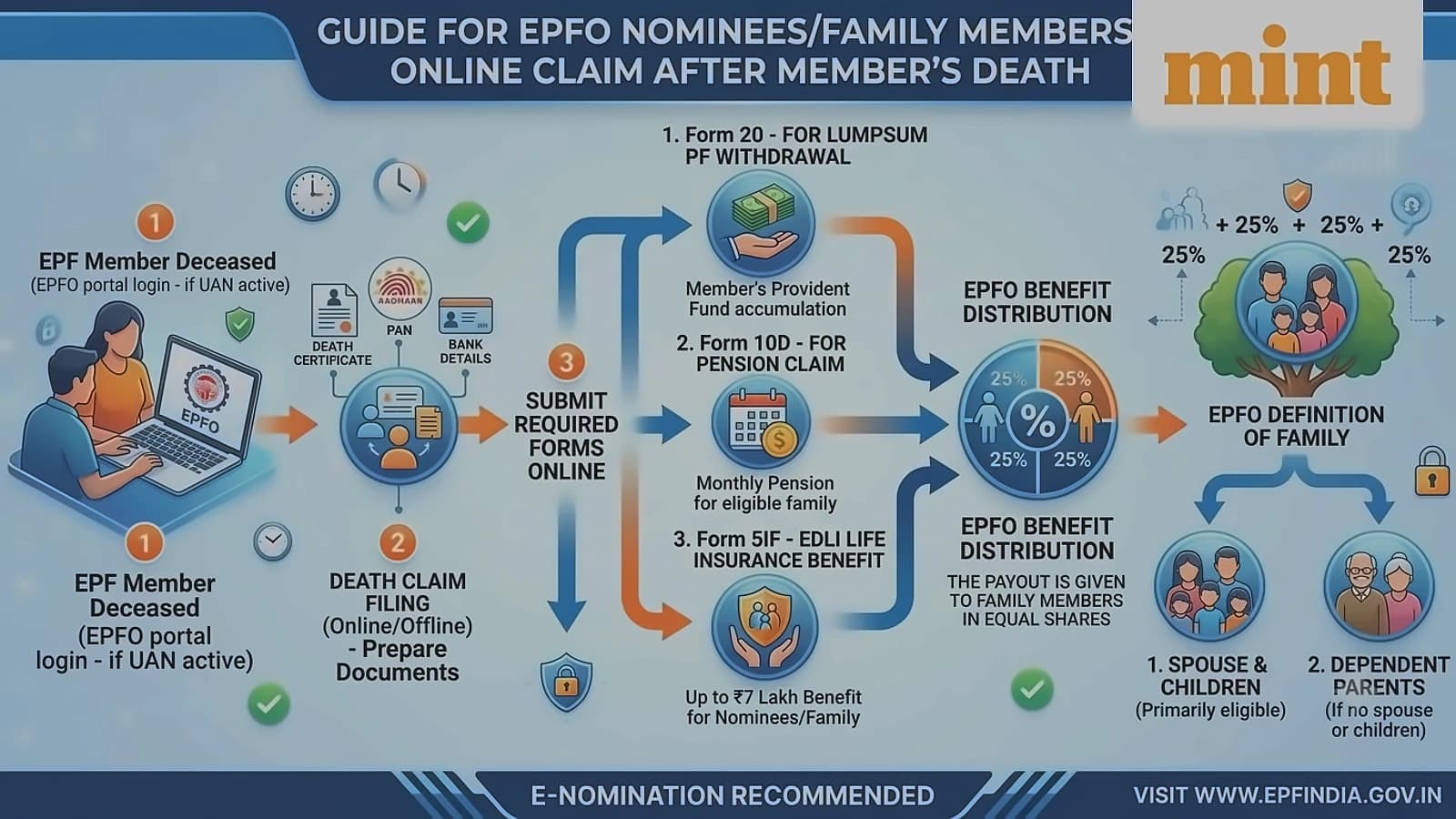
For online claims, families need the deceased EPF member's 12-digit UAN, beneficiary's Aadhaar, name, and date of birth as declared in e-Nomination, along with a death certificate in PDF format (maximum 2MB). As reported by Mint, families must also provide bank proof of the beneficiary, including a cancelled cheque or passbook in PDF format (maximum 2MB). The process requires Form 20 for lumpsum PF withdrawal, Form 10D for pension claims, and Form 5IF for EDLI life insurance benefits.
According to EPFO rules reported by Mint, payouts are distributed to family members in equal shares, with the retirement fund body defining family as spouse and children. When the deceased member lacks spouse or children, the payout goes to dependent parents. The rules allow unmarried members or members without living spouse and/or eligible children to nominate siblings for PF and pension claims. If no eligible family members exist, the sum is payable to legally entitled persons.
The online process begins at the official EPFO members portal (unifiedportal-mem.epfindia.gov.in/memberinterface/no-auth/nomineeAppForm), where families enter the deceased member's UAN, beneficiary details, and captcha. As reported by Mint, users receive an OTP to the member's linked mobile number for validation. The system offers three claim options: PF withdrawal through Form 20, pension claims through Form 10D, and insurance claims through Form 5IF. Families must enter bank details and upload cancelled cheques for each claim before submission.
According to Mint reports, most claim errors stem from verification gaps, outdated details, or system delays. When the system displays 'Members' service details are required against all service records', this indicates incomplete past employment data. To resolve such issues, families can navigate to Service History, contact previous employers for record updates via DSC, or submit a Joint Declaration to EPFO offices with supporting documents like salary slips and death certificates.