Global cryptocurrency exchange WEEX has announced the launch of Multi-Market Mode, a new screen layout designed for traders who need to track multiple assets in real time. According to reports from WEEX, the feature splits a trader's screen into 2, 3, 4, or 6 independent chart windows, each displaying a different trading pair with every window functioning as its own fully independent, fully functional workspace. As reported by WEEX, the feature is available on futures pages through the 'Layout' button in the top right corner, under 'Multi-market', allowing users to select 2, 3, 4, or 6 markets to open in a fresh tab, ready for immediate use.
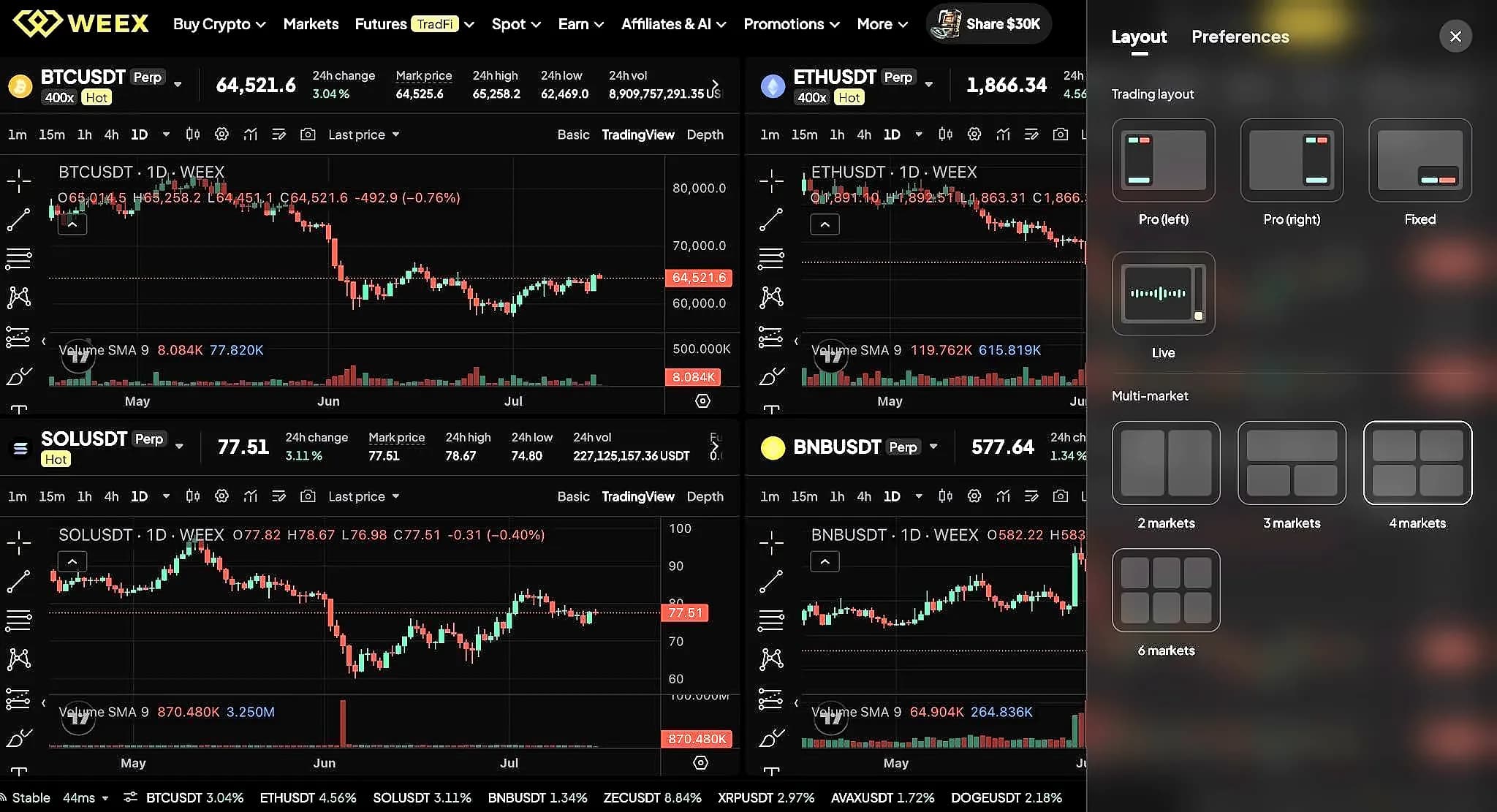
The new layout allows traders to draw their own trendlines, drag the time range, switch timeframes, and switch assets independently per window. As reported by WEEX, each window works as its own workspace where what you do on one doesn't affect the rest. The feature includes automatic layout saving, meaning users can pick up right where they left off without rebuilding their setup every session. According to WEEX, the feature is built specifically for watching several pairs clearly at the same time, with window sizes locked to keep the layout clean and consistent, and everything saved automatically so users can open the same layout again and everything's exactly how they left it.
According to WEEX, swing traders can track several setups at once and catch the moment their entry lines up, while arbitrage traders can watch price gaps across multiple pairs in real time. The feature is designed to help anyone tired of tab-switching see it all on one screen and stop missing moves on the pairs they're not actively watching. As reported by WEEX, the feature solves the problem of watching one chart at a time, which means traders are always one step behind whichever pair they're not looking at, by putting more charts on the screen so they stop having to choose which one to watch.
The Multi-Market Mode is available on WEEX's futures pages through the 'Layout' button in the top right corner, under 'Multi-market'. As reported by WEEX, users can access the feature by selecting 2, 3, 4, or 6 markets to open in a fresh tab, ready for immediate use. The feature includes automatic layout saving and automatic timeframe switching across different windows. According to WEEX, the feature removes quick market or limit order buttons and a few chart icons and annotation toggles in the top-right to keep things clean, focusing solely on the core drawing and annotation tools that traders need for multi-pair analysis.